HSE Connect User Roles and Access
 Updated
by Leo Comia
Updated
by Leo Comia
Overview
This article outlines the different user roles in HSE Connect and the level of access associated with each role.
Understanding user roles ensures the correct level of access is assigned to each person within your organisation.
HSE Manager
The HSE Manager is the designated admin for a company.
Access & Permissions:
- Can access one assigned company only
- Can add, remove, and edit user profiles
- Can finalise Incidents
- Can finalise Risks / Good Jobs
- Full access to:
- Induction settings
- Checklists
- Notifications
- Trainings
- Registers
- Reports
- Receives:
- Incident notifications
- Checklist notifications, including completions
- Can manage Contractor Visits
- Can end Contractor Visits using the HSE Connect app
Manager
The Manager role is designed for operational oversight without access to user administration.
Access & Permissions:
- ❌ No access to user settings
- Can finalise Risks / Good Jobs
- Can only access the Incidents they have reported
- No access to:
- Induction settings
- Reports
- Has access to:
- Checklists
- Notifications
- Trainings
- Registers
- Receives:
- Incident notifications
- Checklist notifications
- ❌ Does not receive checklist completion notifications
- Can manage Contractor Visits
- Can end Contractor Visits using the HSE Connect app
Supervisor
The Supervisor role supports frontline oversight with limited approval authority.
Access & Permissions:
- ❌ No access to user settings
- ❌ Cannot finalise Risks / Good Jobs
- Can only access the Incidents they have reported
- No access to:
- Induction settings
- Reports
- Has access to:
- Checklists
- Notifications
- Trainings
- Registers
- Can manage Contractor Visits
- Can end Contractor Visits using the HSE Connect app
Worker
The Worker role is intended for general employees.
Access & Permissions:
- Can only access the Incidents they have reported
- Can access:
- Risks / Good Jobs
- Notifications
- Trainings
- Checklists assigned to them
Contractor
The Contractor role is for external workers.
Access & Permissions:
- Can only access the Incidents they have reported
- Can access:
- Risks / Good Jobs
- Notifications
- Trainings
- Checklists assigned to them
- ✅ Can scan in and out using the HSE Connect appThis function is exclusive to Contractors.
Visitor
The Visitor role provides limited access.
Access & Permissions:
- Can only access the Incidents they have reported
- Can access:
- Risks / Good Jobs
- Notifications
- Training assigned to them
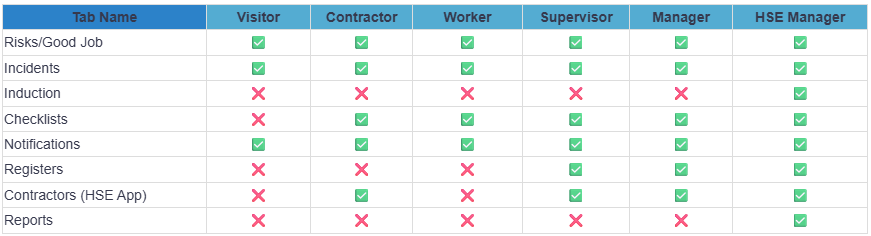
The following table outlines which tabs can and cannot be accessed by each user role:
Other Roles
Administrator
The Administrator role is similar to the HSE Manager, with broader organisational access.
Access & Permissions:
- Can access multiple companies (commonly for organisations with branches)
- Has access to all company settings
- Has unique access to the CSV Report Generator, allowing reports to be generated at any time
- Only Superusers (HSE Connect Support) can create and assign companies to Administrators
- Administrator accounts:
- Do not have an email address linked
- Password resets are managed only by the support team upon request
Main Contact
The Main Contact is the primary contact person for the company, usually assigned during onboarding.
- Typically, the CEO, General Manager, or Owner
- Receives monthly training communications automatically via email
- Acts as the organisation’s primary point of contact for platform communications